
Step-by-Step Office Workstations Desk Purchasing Guide
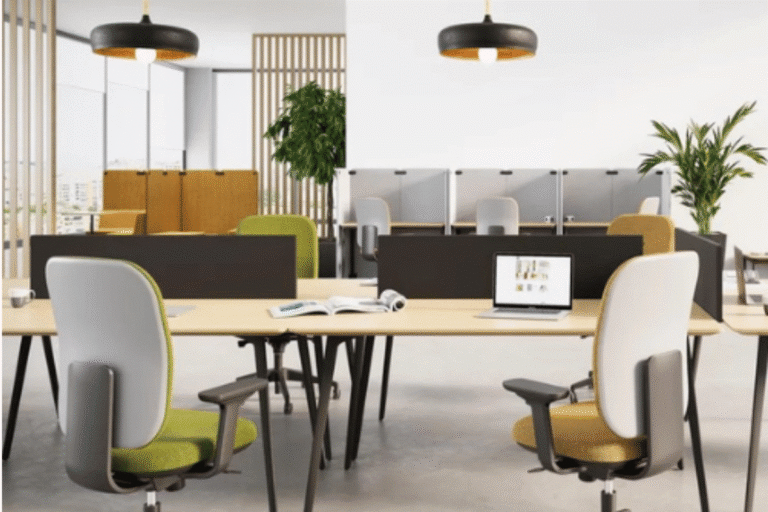
Walking into a completely empty office space can feel both thrilling and incredibly stressful. On one hand, you have a blank canvas to build something amazing. On the other hand, you have to figure out how to arrange the room so your team can actually focus, collaborate, and enjoy their day without getting constant headaches or backaches. Finding the perfect balance between style, comfort, and layout density is a massive project. If you are currently mapping out a brand new floor plan or just refreshing your current setup, choosing the right office workstations will completely set the tone for your daily workspace culture.
At Studio WB, we know that setting up a corporate space takes more than just scrolling through a standard furniture catalogue. We partner with world-class international designers to make the layout process completely seamless for businesses across the region. This practical, step-by-step guide will walk you through the essential factors to consider so you can purchase your new desks with complete confidence.
Step 1: Figuring Out the Best Layout for Your Office Workstations
Before you start browsing different surface finishes or getting excited about color schemes, you need to look closely at how your teams actually spend their days. Different departments need entirely different environments to do their best work, and your desk choices should reflect those distinct daily habits. If you force a creative brainstorming team into isolated cubicles, or a quiet finance team into an open shouting zone, productivity will take a major hit.
Open and Bench-Style Setups
For departments that thrive on constant communication, quick check-ins, and collaborative projects, linear benching or open cluster pods are excellent options. Think about marketing squads, creative designers, or customer support teams who constantly need to bounce ideas off each other. These configurations keep teams close together for easy brainstorming while optimizing your office floor space perfectly. They break down visual barriers and make the office feel a lot more communal and high-energy.
Privacy and Single Desk Configurations
For roles that require high concentration, deep focus, or handling highly sensitive numbers, individual L-shaped desks or setups with integrated desktop privacy screens are much better suited. Human resources, legal counsellors, and financial analysts need a place where they can dive into a spreadsheet or a contract without seeing every single person walk past their monitor. They help minimise visual distractions while still maintaining a cohesive, clean look across the main floor.
Step 2: Prioritising Movement and Physical Comfort
A great desk should never leave your team feeling stiff, sore, or exhausted by lunch. We often think about ergonomics as a buzzword, but when you are sitting in one place for forty hours a week, it is a massive part of physical health. Investing in your team’s physical comfort pays off in a big way through better focus, fewer sick days, and higher daily morale.
Height-Adjustable Systems
Modern workspace trends are leaning heavily toward sit-stand desk options, and for good reason. Sitting perfectly still for eight hours straight isn’t natural for the human body. Electric frames let people smoothly transition between sitting and standing throughout the day with the push of a button. This simple movement keeps blood circulation flowing, keeps energy levels high during that afternoon slump, and cuts down on long-term lower back fatigue.
Proper Legroom and Workspace Clearance
It is not just about the top of the desk; you have to look underneath it too. Many budget desks have bulky support bars or poorly placed storage compartments that force people to sit at awkward angles.c
Step 3: Checking Tech Integration and Smart Storage
A messy desk covered in a tangled knot of wires, power strips, and charging cables is an absolute focus killer. It makes the entire office look cluttered, and it is incredibly frustrating for employees who need to unplug a laptop or set up a second monitor. When you are looking at different desk systems, always check how they handle daily technology requirements.
Built-In Cable Management
High-quality, modern desks are built with technology in mind from the very start. Look for smart, built-in cable trays that run underneath the desk surface, flip-top power sockets that sit flush with the wood, and integrated desk grommets that hide the chaos beneath the surface. This keeps all the heavy power bricks and messy wires completely out of sight.
Modular and Under-Desk Storage
To keep surfaces clear of paperwork, coffee cups, and office supplies, you need a smart storage plan. Instead of giant, immovable filing cabinets that block natural light, opt for matching mobile storage drawers or side cabinets with lockable compartments. Mobile units are fantastic because they can slide right under the desk when not in use or act as a temporary stool when a teammate pulls up to a desk for a quick five-minute chat.
Step 4: Comparing Layout Needs Across Configurations
To help you visualise how different setups distribute density and team interaction across your available square footage, keep this quick overview in mind:
Layout Style | Best Suited For | Main Structural Advantage | Flexibility Factor |
Linear Benching | High-collaboration teams | Maximizes your available floor space and keeps teams connected | High (Can add or remove fabric privacy screens later) |
Cluster Pods | Cross-functional departments | Great balance of private area and shared communication zones | High (Features shared central cable trays for easy setup) |
Sit-Stand Desks | Active, dynamic professionals | Seamless position changes during long hours of deep work | High (Comes with programmable digital height settings) |
Executive Stations | Private management suites | Gives additional surface area and deep storage for documents | Premium (Offers beautiful woodgrain and clean metal finishes) |
Step 5: Choosing Materials That Stand Up to Daily Use
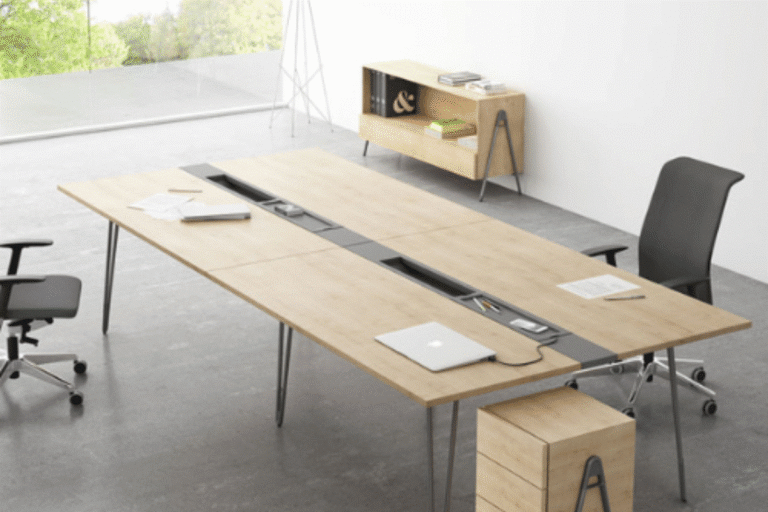
When you look at photos online, almost every desk looks clean and sturdy. However, the commercial office environment is tough. Desks take a beating from heavy monitor mounts, keys being tossed down, constant cleaning sprays, and accidental coffee spills. Choosing the right materials ensures your investment looks great five years from now.
- High-Pressure Laminates: This is the gold standard for daily task desks. It is incredibly scratch-resistant, does not stain easily from drinks, and stands up well to daily sanitizing.
- Solid Wood and Veneers: Best saved for executive suites and boardrooms where you want to make a strong visual statement. It requires a bit more care, but it brings a beautiful, warm texture to private offices.
- Acoustic Fabric Screens: If you are opting for an open plan, choose workstations that support acoustic fabric dividers. These panels don’t just block eyes; they help absorb sound waves, cutting down on the general office hum that makes it hard to focus.
A Quick Procurement Checklist Before Making a Purchase
Before signing off on your final furniture order and scheduling a delivery truck, take a walk through your empty space with a tape measure and use this practical list to double-check the finer details:
- Walking Space: Did you leave plenty of room (ideally at least 90 to 120 centimetres) for walking pathways and for chairs to slide out comfortably without hitting a wall?
- Power Source Alignment: Are your desk clusters lining up with your floor power boxes or wall outlets, or will you need to run ugly rubber cord covers across the carpet?
- Surface Quality: Are the tops scratch-resistant, glare-free under bright office lights, and easy to wipe down after a morning coffee spill?
- Noise Control: Do you need to add fabric desk dividers to help soften sound in the busiest zones of the building?
- Growth Potential: Is the furniture modular so you can easily add extra segments or rearrange things if you hire five new people next year?
At Studio WB, we focus on creating completely transformed spaces where professionals truly love to work. We believe that a workspace shouldn’t just look like a grid of desks; it should feel like an extension of your company’s identity. By sourcing beautiful, functional furniture from top global manufacturers, we handle the hard layout logistics for you. If you are ready to design a balanced, clutter-free workspace that perfectly matches your company culture, exploring our latest layout collections is a wonderful place to start.
Frequently Asked Questions
For a typical setup with a couple of monitors, a keyboard, and daily documents, a desk width between 1200mm and 1600mm is usually the sweet spot. It gives your team plenty of breathing room to spread out their work without eating up all your valuable square footage.
Beyond keeping everything looking clean and organised, hiding wires protects your office electronics from getting accidentally caught on someone’s foot or chair wheel. It completely removes tripping hazards around busy walkways and prevents expensive equipment from getting pulled off a desk.
Absolutely. In fact, the best modern offices use a mix of configurations. You could have a row of linear bench desks for your sales team, a few electric sit-stand desks for flexible use, and a couple of quiet, screened-in pods for deep focus work.
At the end of the day, picking out your corporate furniture is all about building an environment where your team feels comfortable, valued, and inspired to do their best work. A thoughtful layout shows your employees and your visiting clients that your business values real quality, daily well-being, and attention to detail.